How to Build an AI Ad Research Tool With Claude Code
You can build an ad research tool with Claude Code by describing the problem in plain English, letting it plan and build, then connecting an Apify key to scrape the Meta Ads Library and an Anthropic key for the AI analysis. The tool downloads each competitor video, breaks it down frame by frame, and returns the hook, offer, proof and call to action, plus a script you can adapt for a client.
Video chapters 7
- Describe the tool to Claude Code the way you would brief a person, and ask it to plan before it builds.
- Two keys do the heavy lifting: an Apify token to scrape the Meta Ads Library and an Anthropic key for the AI analysis.
- A frame by frame analysis catches things a transcript misses, such as a physical prop used as the hook.
- Expect to give feedback after the first version. The first build will not be perfect.
- Add a swipe file, a watch list and bulk analysis so the tool stays useful after the first search.
What does the ad research tool do?
Most agencies write ads from instinct, while competitors keep running the same few winning ads for months. This tool replaces the manual research. It searches the Meta Ads Library for you, either by competitor name or by keyword and location, and pulls the live ads into one simple screen.
For each ad it downloads the actual video and analyses what happens on screen, not only what is said. It then reports the hook, the offer, the proof and the call to action, scores why the ad has probably been running for so long, and writes a client ready script you can adapt for your own accounts.
Doing this by hand means watching every video, writing notes and listing hooks one ad at a time. Running it on a batch of ads takes a few minutes instead of a few hours.
How do you brief Claude Code?
The first prompt is spoken, not engineered. We used the voice input in the Claude Code desktop app and described the situation: a marketing agency with around 50 clients in one niche that constantly needs new creative, and a wish to see what competitors are running on Meta.
We asked for a very simple interface that links to the Meta Ads Library, investigates each ad, pulls the transcript, gives a frame by frame summary and explains why an ad is successful. We suggested Apify as the scraper but told Claude Code to research the best option itself. We also said it should run locally and have a distinctive look.
The prompt deliberately says nothing about the back end or the code. It only says what we want and why, and asks for a plan.
Which Claude Code settings matter for this build?
Claude Code offers several modes. Ask permissions and accept edits are the safer ones, so use them for code you need to control tightly. Plan mode only plans and changes nothing, which suits complicated work. Auto mode runs on its own. We used auto mode for this build.
You can also choose the model and how much effort it puts in. Smaller models use fewer credits but are less strong, and higher effort uses more. Usage is limited by a five hour session timer that starts with your first message, plus a weekly limit that resets every seven days.
Claude Code will ask clarifying questions before building. Ours covered which accounts and keys we already had, whether to search by competitor or by keyword and location, and how to rank ads. We chose both search types and ranked ads by how long they had been running, plus variance, because real spend is not visible in the library.
How do you connect the API keys?
This is the step many tutorials skip. Without it the tool is a mockup. Claude Code gave us a step by step guide, and we followed it while the build carried on in the background.
Treat every key like a password. Anyone holding it can use your account to run up bills and access your data. Never paste keys into public places, and delete any key you showed on screen.
- Log in to Apify, open the API and tokens section in settings and create a new token. This lets the tool scrape the Meta Ads Library.
- Create a key in your Anthropic account. This gives the tool its AI brain for the video analysis. You can use another AI model if you prefer.
- Open the project files in Claude Code, find the environment file where keys are stored, paste both keys in and save.
- Leave the keys in that file only. Do not put them in prompts, chats or screenshots you share.
What should you check in the first version?
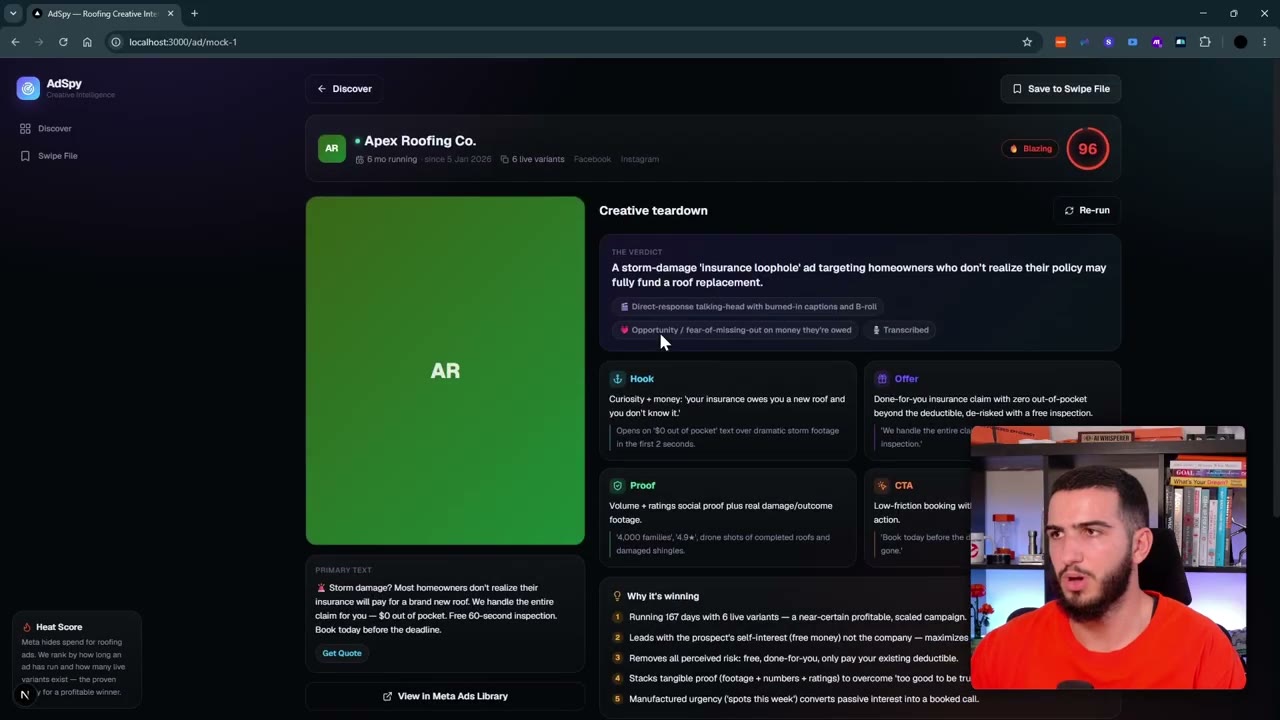
The first version looked clean enough but had problems. The interface leaned on the usual purple styling, the ads shown were mockups, and there was no search box to enter a competitor. The breakdown layout was good, with a transcript, why the ad works, the proof, the call to action, the offer and a client ready script. It also had a rerun option and a swipe file for saving ads.
The most important test is whether the tool pulls real data from Meta. If that core part fails, nothing else matters. We asked for a fix to the search, reloaded, and searched for a competitor who was actually running ads, cross checking against the Meta Ads Library itself.
It then scraped a real set of ads. Some were images, and some could not be played inside the tool. The teardown showed how long an ad had been running, where it ran, a score and the call to action, and saved the result to the swipe file.
- Does the search return real ads rather than placeholder examples?
- Can you search by competitor name and by keyword?
- Do video ads play inside the tool before you analyse them?
- Does the swipe file save what you click?
How does the frame by frame teardown work?
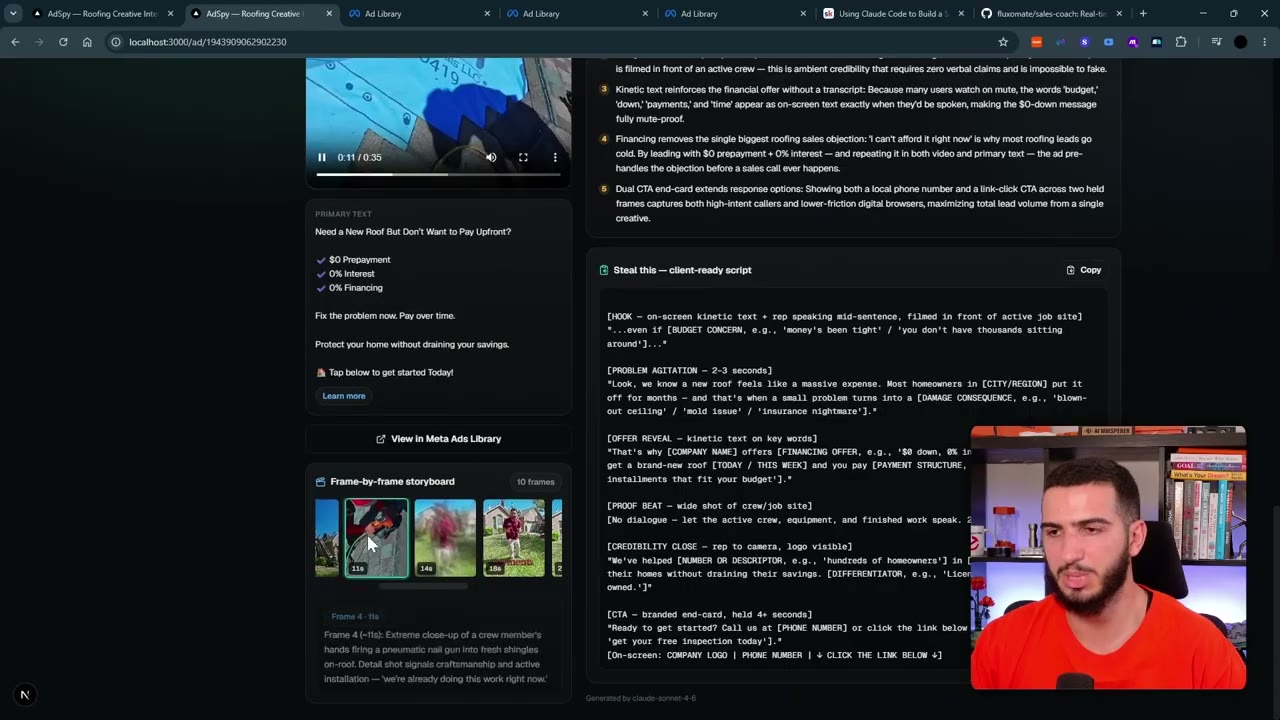
For a video ad the tool downloads the video, splits it into frames and describes what happens in each one. It combines that with the transcript to diagnose the hook, the offer, the proof and the call to action, then explains why the ad works and writes a script for your client.
In our test an ad in Spanish was picked up correctly, and the proof was identified as live action footage on a job site. In a later bulk run, the tool spotted a physical prop reveal as the hook. A transcript alone would never show that, which is the reason for analysing frames.
Which feedback rounds improve the tool?
After the first version we gave Claude Code broad feedback in plain language, the same way as the first prompt. Each round made the tool more usable. Expect to do the same, because the tool will not know what you want until you tell it.
Be aware that the video analysis uses credits, so bulk analysis should show an estimate of cost before it runs.
- Play the ad inside the tool before analysing it, and expand landscape images instead of cropping them.
- Filters for image or video ads, business name, ad length, keywords and competitors, with multiple select.
- A clear mark on which ads have already been broken down.
- A top winners view, ranked by how long ads have run.
- A watch list, so you can add advertisers and rescrape them later.
- An analyse all option with a cost confirmation first.
- A notification when a scrape finishes, and a fixed navigation bar that stays put when you scroll.
How do you analyse ads in bulk?
Once a scrape finishes, you can analyse every ad in the set in one go. We scraped around 30 ads from a single advertiser, filtered the list and ran the analysis on all of them. When a batch fails, open one ad on its own to find out whether the fault is the bulk run or the analysis itself. Then reload and try a smaller group.
Saved ads go to the swipe file, and advertisers you want to monitor go on the watch list, where a refresh button rescrapes them. Later additions could include a chat box to ask questions about the ads, extra context about your own business so scripts are tailored, and a link to your own ad account to compare results against the market.
Questions people ask
Can Claude Code scrape the Meta Ads Library?
Yes, when it is connected to a scraper. In this build we used Apify and gave Claude Code the token. The tool can search by competitor name or by keyword and location, and it downloads the ads, including the video files.
Do I need to be technical to build an ad research tool?
No coding knowledge was needed for the first version. We described what we wanted in plain English and followed the key setup guide Claude Code produced. Running it day to day inside a team is more complicated and needs more work.
Why analyse ad videos frame by frame instead of using the transcript?
A transcript only captures speech. Frame by frame analysis shows what is on screen, such as a live action job site or a physical prop reveal used as the hook, which would be invisible in the words alone.
How should I look after the API keys?
Treat them like passwords. Store them only in the environment file for the project, never share them in chats, videos or screenshots, and remove any key you exposed.
Rather have it built for you?
Fluxomate builds internal tools and AI agents for agencies. On your stack, owned by you.
See if you qualify