How to Build an Instagram Scraper With Claude Code
You can build an Instagram scraper by describing it in plain language to Claude Code. It scrapes an account's recent reels through Apify, ranks them by engagement, and sends the top ones to Gemini for a transcript and frame by frame breakdown. Claude Code then writes the results to a dashboard you can turn into a small app with a watch list, memory and chat.
Video chapters 7
- The tool takes any account, pulls reels from the last 30 or 60 days and ranks them by engagement.
- Each top reel gets a transcript, a hook split into spoken and visual, and a scene by scene breakdown.
- You build it with plain language prompts. No technical instructions are needed.
- Two API keys are needed: one for Apify to scrape and one for Gemini to analyse. Store them in a local env file.
- Fact check the first output against Instagram itself, then ask for fixes.
- Turning the skill into an app adds a watch list, memory and a chat that knows your business.
What the Instagram scraper does
Content agencies often study competitors by hand. They scroll reels, screenshot frames and guess why something worked. This tool automates that research.
You give it an Instagram account. It pulls that account's reels from a recent window, such as the last 30 or 60 days, and ranks them by engagement, using signals such as likes, comments, saves and plays. It takes the top performers and runs each one through a full breakdown: the transcript, a hook split into what is spoken and what is shown, a scene by scene description of what is on screen, and why it worked.
Everything is written into a dashboard. You can also run it across several competitors and compare what works in your niche, so you get ideas for your own content.
Set up Claude Code and a project folder
We use the Claude desktop app and its code tab. You need a paid plan to use Claude Code. You can also use it in a terminal or in an editor such as VS Code or Antigravity, but the desktop app is the simplest start.
Before you begin, choose a folder to build in. Everything is built locally, so all the code and files live in that folder on your laptop. If you later deploy it somewhere such as GitHub or Netlify, you move that folder to the platform.
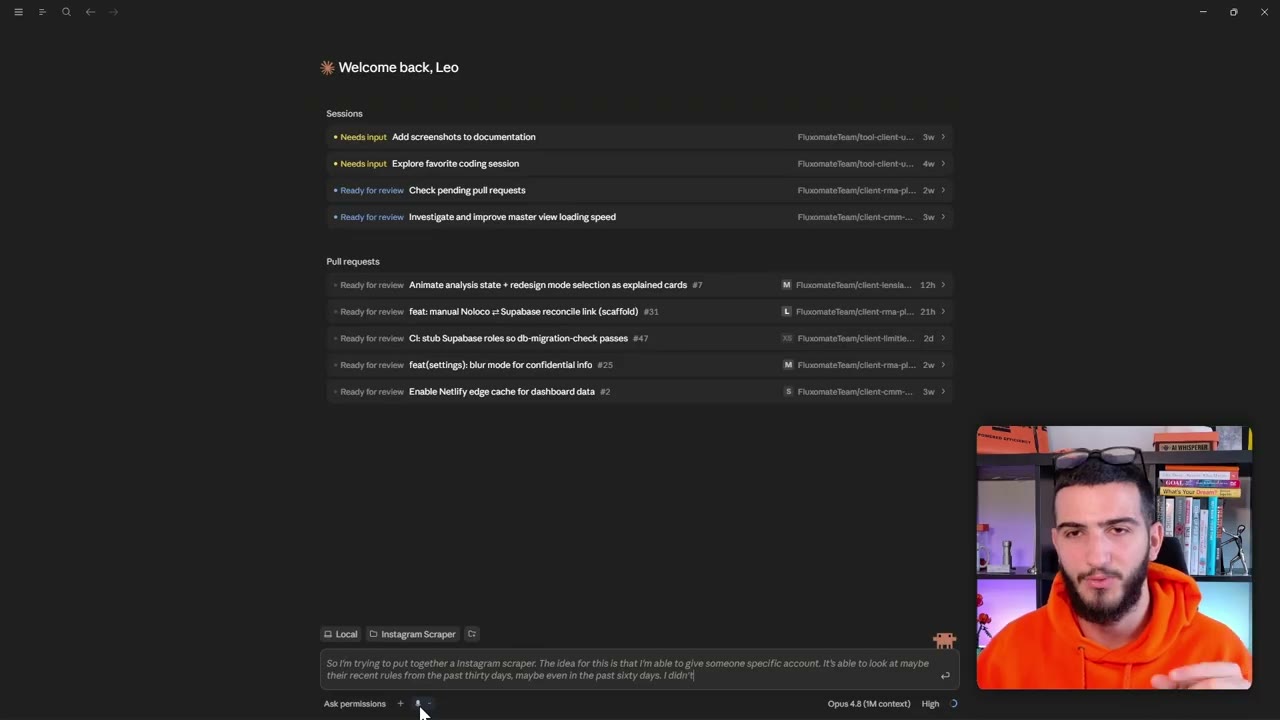
Claude Code has four permission modes, shown beside the chat box:
- Ask permissions: it asks before it does anything.
- Accept edits: it accepts edits to code for you.
- Plan mode: it studies the existing code, asks questions and plans before touching anything.
- Auto mode: it accepts things automatically, which is what we used.
Write the first prompt
We dictated the prompt using the built in transcriber, and described the idea in everyday language. In essence it said: build an Instagram scraper. Give it an account, look at recent reels from the past 30 or 60 days, pick top performers based on engagement, then get each video's transcript and a frame by frame breakdown. The aim is to understand the hook and repeating patterns, so we can compare competitors and get ideas for our own content.
We also asked for a visual interpretation, not just a transcript, and said it should run locally and stay simple. Then we asked Claude to question us to understand the idea, and to make a plan.
It came back with questions about the approach. We took its recommendations: use an API for scraping, use Gemini video upload for transcripts and the visual breakdown, write a markdown report per account, and start with a few accounts for a proof of concept.
Check the plan before it builds
Claude Code sometimes rushes to a final solution. That is fine for a small build like this, which works more like a skill than a full app. For something bigger, such as an ad generator, spend more time on the plan. The more you settle at the start, the less you rework later.
You do not need to judge the technical side, because it is better at that than you. You only need to check that it understands what you want.
The plan was: list competitor usernames, pull reels from the last 30 to 60 days, rank the top by engagement, download the videos, send each to Gemini for a transcript, frame by frame visual breakdown and hook analysis, then write a markdown report per account plus a summary of what is working across videos. Once happy, we approved it.
Get the API keys and store them safely
Some things Claude Code cannot do for you. You have to provide API keys, which work like passwords that let software access other software. We asked it for step by step instructions to get them, then followed along.
Two are needed. The first is an Apify token, created in the Apify console under settings, then API and integrations. We set a short expiry on ours. The second is a Gemini API key, created in Gemini. You may need billing set up on one or both, and the amounts are small.
Treat these like passwords. Do not share them, because anyone with a key can use your accounts and run up charges you are responsible for. The proper way is to ask Claude Code to create an env file, then paste the keys into it. That file stays on your machine and is not deployed to the internet. Once we saved the file, Claude Code noticed and checked the keys itself.
Run the first scrape and fact check it
Claude Code ran a live test on a real brand account without being asked. It hit some errors, corrected itself and produced a full output. It scraped recent posts, filtered to reels in a 30 day window, ranked them by engagement, and ran Gemini on the top ones.
The first report was markdown and made it hard to see the frame by frame breakdown, so we asked for an HTML output. It is important to check, because you do not want the model hallucinating. We compared the numbers on the dashboard against the account on Instagram: likes, comments and so on.
Most matched, but the views were off. Claude Code explained that Instagram shows the play count, not a view count. It then updated the tool to show the play count. We ran a second account and asked it to report how long each scrape took and what it cost. Both were low.
Turn the skill into an app with a watch list, memory and chat
At this point it was a skill running inside Claude Code. We then asked for a simple interface, a list of competitors to scrape on a regular basis, and a chat to ask questions about the data.
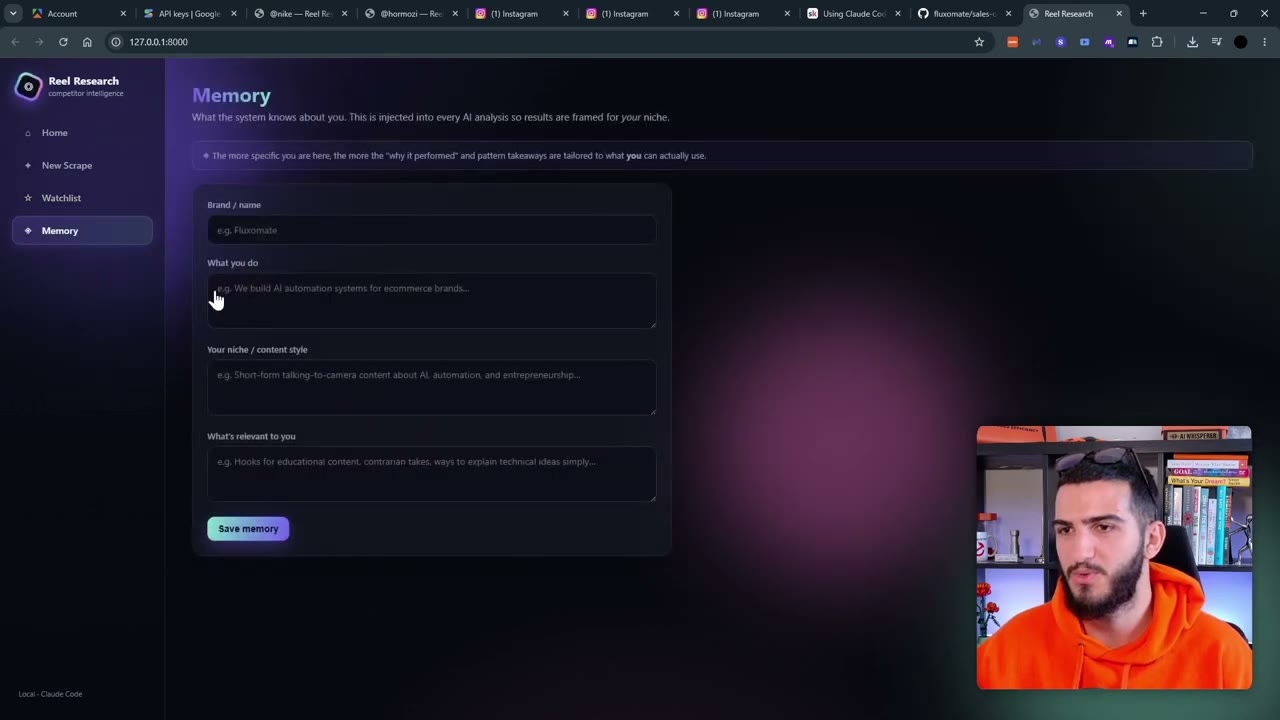
The first version had new scrapes, a watch list, memory and the earlier scripts. You enter a username, choose a window such as 60 days, and run the scrape. You can add more than one account. The app showed progress while it scraped, ranked, analysed patterns and built the dashboard.
We gave feedback as we found issues. For example, pictures did not load while a script was running, so we sent a screenshot and asked for a fix. We also added context about our own business to the memory, so the chat could answer questions such as which hooks to borrow and what we could apply to our brand.
What to watch out for
- Bugs happen. When the newest Opus model was busy, we switched to the previous one and carried on. When an error stopped a build, we told Claude to pick up where it left off.
- Always verify the data against the source before trusting the dashboard.
- Do not paste keys into chat. Use an env file.
- Do not wait idle while the AI works. Run several chats or projects at once and check in as each needs you.
- A local tool is a proof of concept. Putting it live, securing it and connecting it to your other systems, such as a content system, is a separate job.
- Start from your problem, not the tool. This is useful if your team studies competitors every week. The same pattern works for other platforms and for ad libraries.
Questions people ask
Do I need to know how to code to build an Instagram scraper with Claude Code?
No. We described the goal in plain language and Claude Code worked out the technical side, including how to connect the API keys.
Which tools does this Instagram scraper use?
Claude Code builds it. Apify scrapes Instagram, and Gemini produces the transcripts and frame by frame breakdowns of the top reels.
How does it decide which reels are top performers?
It ranks recent reels by engagement, using signals such as likes, comments, saves and plays, and analyses the highest ranked ones.
Why did the view counts not match Instagram?
Instagram shows a play count rather than a view count. After we pointed out the mismatch, Claude Code changed the tool to show the play count.
Can I use the same approach for other platforms?
Yes. The pattern is scrape something, break it down, then use the result. It can be applied to other social platforms and to ad libraries.
Rather have it built for you?
Fluxomate builds internal tools and AI agents for agencies. On your stack, owned by you.
See if you qualify