Claude Code Modes and Usage Limits Explained for Agencies
Claude Code has five modes: ask permissions, accept edits, plan mode, auto mode and bypass permissions. Start every new build in plan mode so Claude plans before it acts, then accept the plan in auto mode. Usage is limited by a five hour session limit and a weekly limit, so you need a paid plan and an eye on your credits.
Video chapters 7
- Always start a new tool in plan mode, so Claude plans before it builds anything.
- Ask Claude for more questions before you accept the plan, because it can rush.
- Use auto mode for the build itself, so it does not stop to ask permission every few minutes.
- Fast mode uses a lot of credits, so leave it off unless you need it.
- Claude Code has a five hour session limit and a weekly limit. Check both before a long build.
What are the Claude Code modes?
A mode controls how much Claude asks before it acts. You can change it from the prompt area in the Claude desktop app. There are five.
- Ask permissions: Claude asks before it does something.
- Accept edits: Claude still asks about some things, but in most cases it accepts file edits automatically.
- Plan mode: before it does anything, Claude plans it all out and waits for your decision.
- Auto mode: Claude works through the task on its own, with no questions.
- Bypass permissions: a full unlock. Claude does whatever it wants and gives you the end result.
Which mode should you use for each stage of a build?
The first four are the ones most people use. When you start a new project or a new tool, always begin with plan mode, so that Claude plans it before building anything.
When the plan is ready, you get choices. You can revise it, accept it, or accept it and switch to auto mode. For the build we choose auto mode, because otherwise Claude asks a question every few minutes. Bypass permissions is the most hands off option, so be aware of what you are allowing.
How do you get a better plan out of plan mode?
Describe the result you want in plain language and do not specify a technical setup. In the example, the prompt for a live sales call coach said what it should do, how it should look and asked Claude to question us as much as needed. Nothing was said about structure or back end. We dictated the prompt with the microphone button, which is built into the app.
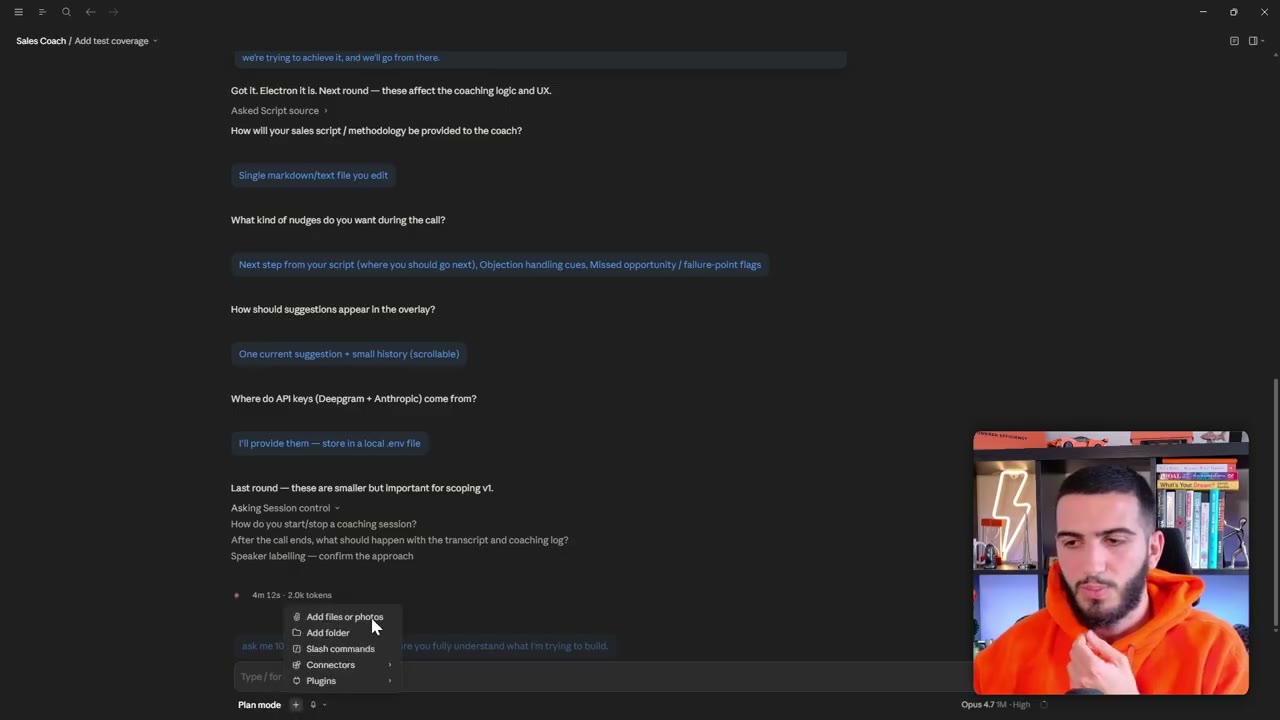
Claude then asks multiple choice questions. In the example these covered how to capture audio, what form the overlay should take, where speech to text should run, which model should write the coaching, how the script should be provided and which kinds of cues to show. You can take the recommended option when you do not mind.
Be aware that Claude can rush a plan so it can start building. Before accepting, we asked for more questions, for example by typing: ask me 10 more questions to make sure you fully understand what I am trying to build. It came back with further batches covering things like how coaching starts and stops, what happens to the transcript afterwards, how speakers are labelled, what the agency sells and how long a suggestion stays on screen.
You do not always need this for a simple project. For a bigger one it is worth it. When the plan is ready, read it to check that Claude understood what you are building, not to judge the technical detail.
Which model and settings should you choose?
At the bottom right of the prompt area you can pick a model. We recommend the newest and smartest option, which at recording time was Opus 4.7. There is also an effort setting, which we leave on high, though you can change it.
There is a fast mode too. It is disabled in the video because it consumes so many credits, and we do not recommend it. The plus button at the bottom lets you add folders, slash commands, plugins and connections.
How do Claude Code usage limits work?
To use Claude Code the way shown here you need a paid plan, though not necessarily the largest one. You do need to be aware of credits. There are two kinds of limit.
The session limit works on a five hour window that starts automatically. The weekly limit resets every week. The interface shows both as a percentage, along with how long until the session limit resets. Before a long build, glance at it. In the video it was checked when auto mode started, and again later to see how much the build used.
How do you work on more than one thing at a time?
A long build takes time, so do not sit and watch it. You can open several sessions and run them side by side. In the video one session was building the interface while another created the environment file.
There is also a remote control command. Type a slash followed by remote control, and you can continue the same session from your phone. You can ask questions from the phone and it acts on what is happening on the laptop. It is useful away from your desk, for example on a walk.
Why does the feedback loop matter?
The first version of a build rarely works completely. The sales coach video needed several rounds: the interface was too transparent, the layout was too vertical, and the start button failed because the microphone could not be captured. Each round was a short message describing the problem, sometimes with a screenshot.
Do not give up straight away. The AI is smart, but you have to test, tell it what you saw and let it make mistakes. Beginning is quick, and getting something ready for real use takes longer.
Questions people ask
What is plan mode in Claude Code?
Plan mode makes Claude plan a task before it does anything. It asks you questions, proposes a plan and waits. You can then revise it or accept it and choose which mode to build in.
What is the difference between auto mode and bypass permissions?
In auto mode Claude works through the task by itself. Bypass permissions is a full unlock: it does whatever it wants and just gives you the end output. Use that one with more care.
How do the five hour and weekly limits work?
The session limit is a five hour window that starts automatically, and the weekly limit resets once a week. The Claude interface shows the percentage used for each.
Do I have to pay to use Claude Code?
Yes. You need a paid plan to use Claude Code the way shown in the video. You do not necessarily need the biggest plan, but you should keep an eye on your credits.
Rather have it built for you?
Fluxomate builds internal tools and AI agents for agencies. On your stack, owned by you.
See if you qualify