How to Get Agency Clients to Actually Update Their CRM
To get agency clients to update their CRM, use three levels together: automations that remind them before and after appointments, expectations set at every touch point from onboarding onwards, and a conditional results promise that requires CRM use. Then track the percentage of leads updated each week so you can see whether usage is rising or falling.
- Automations hold clients accountable so your client success team does not chase them by hand.
- Four reminders cover most cases: appointment reminders, stale lead alerts, a weekly CRM report and a pre strategy call nudge.
- Tie updating the CRM to the client's own results, so they have a reason to do it.
- Add CRM use as one condition of your results promise, with a baseline such as 80% of leads updated.
- Track the percentage of leads updated: updated leads divided by total leads, times 100.
Why do agency clients need to update the CRM?
If you run lead generation for clients, you need to know how much money those leads produce. Without that, you cannot tell whether the leads you deliver are working. Clients who leave their CRM untouched leave you guessing.
When clients do update it, you can see who is doing well and who is not. Good results give you a reason to ask for a testimonial, offer an upsell or share what works with other clients. Poor results give you a reason to step in, for example by changing the ads, raising ad spend where you manage ads, or offering sales training. None of that is possible without the data.
We use three levels to get this done: automations, expectations and a conditional results promise. They work best together. The video above walks through all three.
Level one: which automations get clients to update the CRM?
The job of these automations is to hold clients accountable on autopilot. Your client success team no longer has to message each client every day. Each one is a single flow, and the first can take around ten minutes to build. We use GoHighLevel for the pipelines, but the logic works in any CRM that can trigger messages.
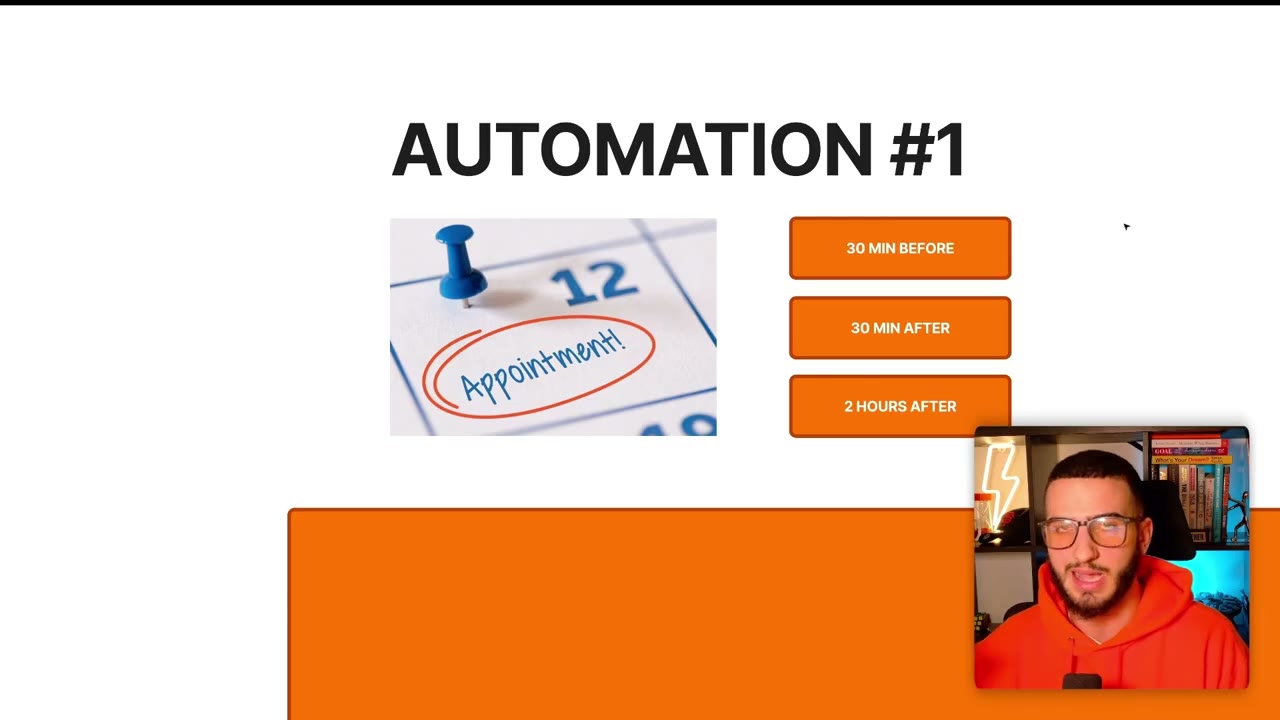
The first automation sends reminders around each appointment. These go to the client, not to the lead.
- Trigger the flow when an appointment is booked in the calendar.
- Send the client a reminder 30 minutes before the appointment.
- Send a second reminder 30 minutes after the appointment, saying the lead has not been updated yet.
- Two hours after the appointment, check whether the client has updated the CRM or completed a short form.
- If they have not, send another reminder by SMS, email, voice note or whatever suits your clients.
How do you chase leads that have not been updated?
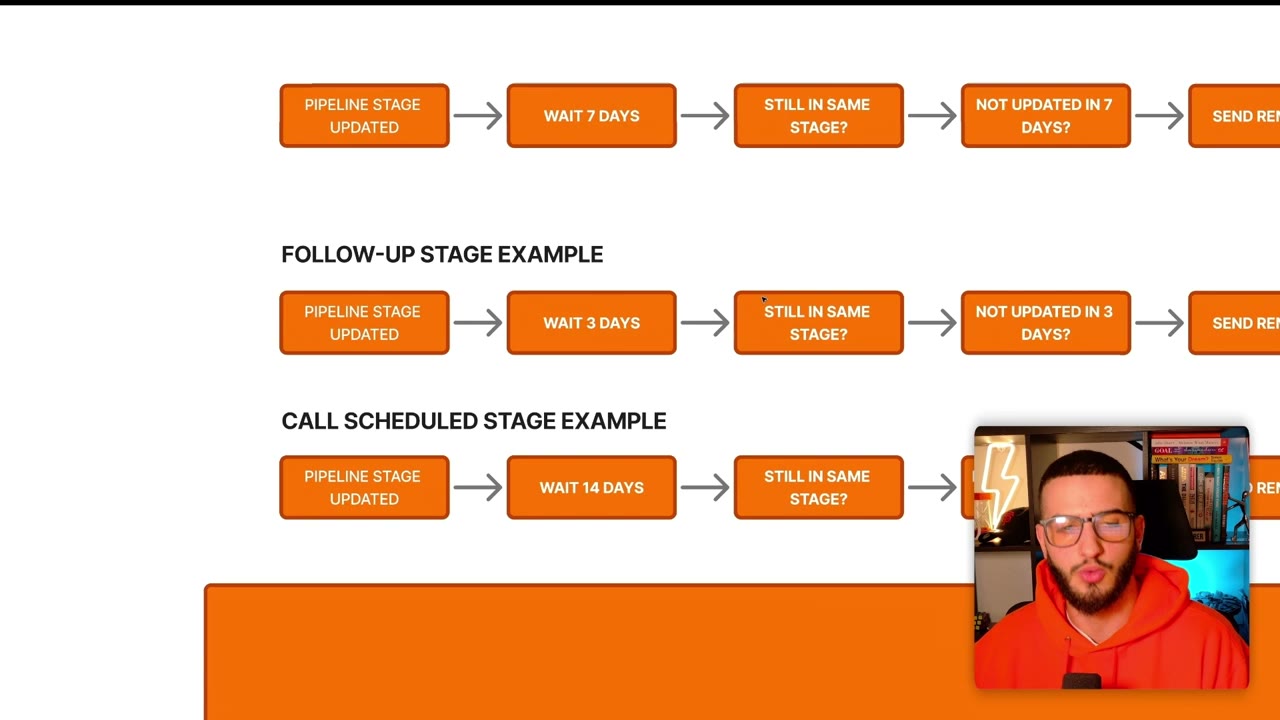
The second automation finds leads that have not been touched for a set number of days. It is less common, but we have put it in place for partner agencies. Whenever a lead moves to a pipeline stage, wait a set time, then check whether the lead is still in that stage. If it is, the client probably has not updated it.
We recommend adding one more check: whether the record has had any other activity in that period. A client may have sent a message, updated the contact or planned a call back, so the lead may be fine even if the stage has not changed. If both checks fail, send the reminder. It can be an SMS, an email, an internal notification or a Slack message.
Do not use one wait time for every stage. Match the wait and the message to the stage:
- A follow up stage might wait 3 days, because the client should be working those leads daily.
- A call scheduled stage might wait 4 days, because the call may be set for the future.
- Make the message specific, such as telling the client a lead has been in follow up for 3 days and should have been contacted yesterday.
- For a call scheduled lead, say it has sat in that stage for 14 days and ask the client to update it with the next steps.
What about weekly reports and strategy call reminders?
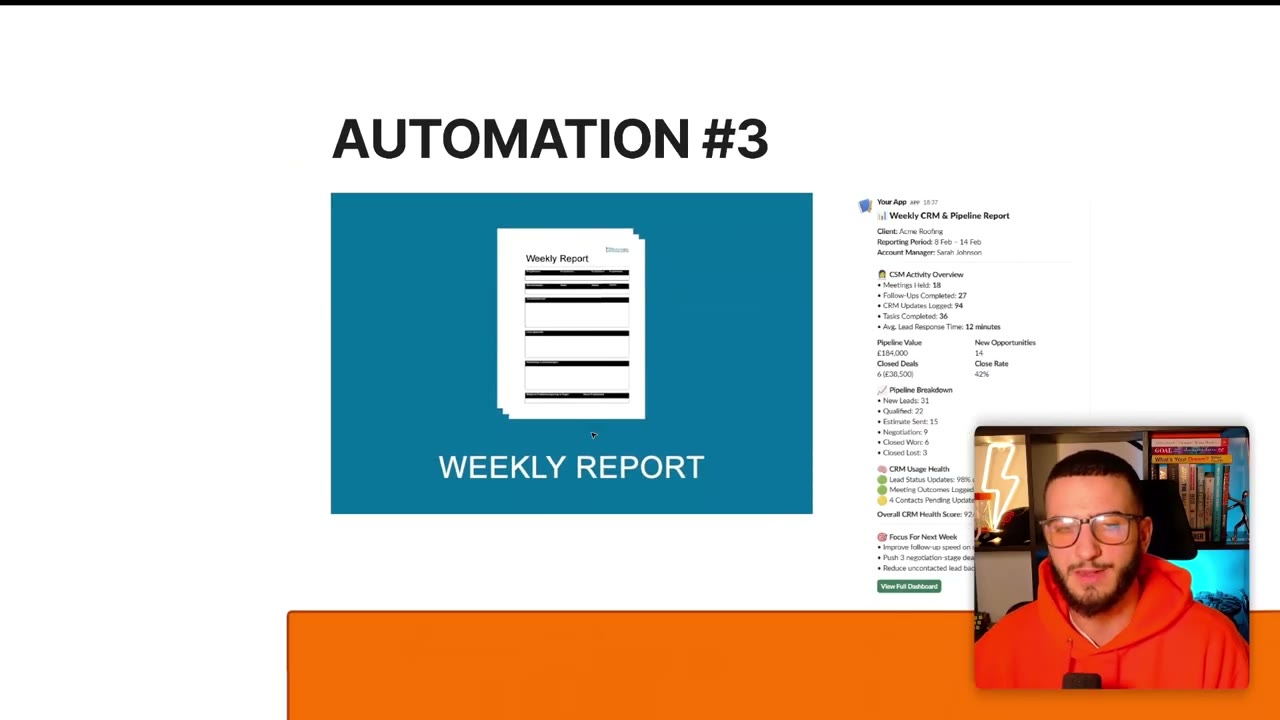
The third automation is a weekly CRM report, separate from any ad reporting you already send. It shows the pipeline value, how much of the CRM they have used and a breakdown by stage. Seeing the size of the opportunity makes clients more motivated to follow up and update. A client who sees 22 qualified leads they have not followed up will usually go and do it.
To build it, keep a list of clients in a sheet or software. For each one, pull the pipeline stages from the CRM, generate a short report (AI can write it) and send it to the client. If you want more control, send it to your client success manager first, who can review it and pass it on. A slide deck works too. The point is one more weekly touch point.
The fourth automation goes out before strategy calls. In partner agencies we saw ten minutes of each call spent going through contacts and fixing values. That is a poor use of a client success manager's time. When a client books a call, send a message 30 minutes beforehand asking them to update the CRM first. This sets the expectation that the work is done before the call, not during it.
Level two: how do you set the expectation from day one?
Updating the CRM is one of many expectations you set when you onboard a client, and you should repeat it throughout the relationship. Map it into your customer journey. If you do not have one, write down what happens in the first 7 days, then 30, 60 and 90 days. On that map, mark where you set expectations, where you pitch upgrades, where the client needs a win and where you collect testimonials.
Every touch point is a chance to reinforce it: strategy calls, client success check ins, group calls and weekly reports. Each time, check that the CRM is being updated.
The key is to link it to their own results. If they update the CRM, you can see what is happening and fix problems such as unqualified leads, leads that are too far away or leads that are not being converted. We use the same approach with our own team: explain how a request helps them reach what they want, and they are far more likely to do it.
Do not be afraid to hold clients accountable. People change their behaviour when they know they are being observed, a pattern known as the Hawthorne effect. If a client ignores a simple request again and again, that is worth questioning. Set this up during onboarding, but you can also introduce it to existing clients by telling them the process is changing.
Level three: how do you use a conditional results promise?
If your agency offers a results promise, make it conditional. The client must do certain things to qualify, such as replying to Slack messages, spending a set amount on ads or recording a testimonial. Add updating and using the CRM to that list. In practice it is one more bullet point in your contract.
That sets the expectation from the start. The promise that attracts most clients is tied to them doing their part, and CRM use is part of it.
How do you track whether clients are updating the CRM?
The simplest measure we use is the percentage of leads updated. Divide the number of updated leads by the total number of leads, then multiply by 100.
Record it in a Google Sheet on a regular basis so you can see usage going up or down. You can automate this later, but at the start have your client success team do it by hand once a week. It may take around half an hour in total, depending on how many clients each person manages.
You can also set a baseline in the contract. For example, 80% or more of leads in the CRM must be updated, or the promise does not apply.
Questions people ask
How do I get my agency clients to update the CRM?
Use three levels together. Automate reminders before and after appointments, stale lead alerts, a weekly CRM report and a nudge before strategy calls. Set the expectation at onboarding and every touch point. Add CRM use as a condition of your results promise.
When should reminders go out around an appointment?
Send one 30 minutes before the appointment and one 30 minutes after. Two hours after, check whether the client has updated the CRM or completed a form, and only send another reminder if they have not. This avoids messaging clients who have already done it.
How do I measure CRM usage by clients?
Track the percentage of leads updated: updated leads divided by total leads, times 100. Log it weekly in a Google Sheet. Doing this by hand at the start is fine, and you can set a baseline such as 80% in your contract.
What should the weekly CRM report include?
It should show the pipeline value, how much of the CRM the client has used and a breakdown of leads by stage. Its purpose is to show the client the opportunity sitting in their pipeline so they follow up and update leads.
Rather have it built for you?
Fluxomate builds internal tools and AI agents for agencies. On your stack, owned by you.
See if you qualify